An assistant that already knows your work, and builds the tools you need.
With the right context, AI can do amazing things. But most of us are stuck feeding it that context over and over, when what it really needs is consistent access to our work.
HQ for Action turns your AI into an expert task, project, and calendar manager, and gives you a foundation for building the tools it needs to do reliable work for you.
- Installs in minutes
- No learning curve
- Full version history for safe building
The killer feature: Start with Claude.
What if every task you start began with a fully briefed collaborator, ready to coach you through the work, or, as you build out your tools, even do it for you?
That's what's possible when AI has access to your tasks, projects, notes, calendar, and whatever else is relevant to your work. You click one button, and a few seconds later you're in a conversation with an assistant who knows the task, the project, and everything you've written about it.
Watch: Start with Claude 8 min
Open a task and Claude is already briefed. Nothing to explain, no blank page.
Easy to start. Easy to be a power user.
Most software makes you choose: ease or power? Simple apps are simple until you want something they don't do. Powerful apps can do anything, but good luck setting them up.
HQ for Action doesn't make you choose, because it isn't software in the traditional sense. It's a foundation for building your own tools.
It's easy to start. Talk about your tasks and projects, and Claude sets them up reliably. It can even bring them over from another tool, if there's a way to connect to it.
And it's easy to be a power user, because you're not the builder. Claude is. Tell it what you want, let it build, and refine it in conversation until it's right.
“I imported all of my projects and tasks, then just built all of the views and displays and filters and buttons I needed, and it's just been so easy. It's just brilliant.”
Gavin Williams, Professor, NC State University
Watch: tasks and projects, by talking 10 min
Describe your tasks and projects in your own words. Claude files each one in the right project, with the right dates, including tasks that repeat.
It's yours, and Claude keeps it running.
HQ for Action lives in a folder of plain files on your own computer—not a database, not an account, not a format only one app can open. I don't know what AI will look like in a few years. Your files will still be your files.
You don't maintain it, either. When something isn't working, say so, and Claude changes it. Every change is saved, so if you don't like how something turned out, Claude rolls you right back.
“I call my HQ my executive assistant.”
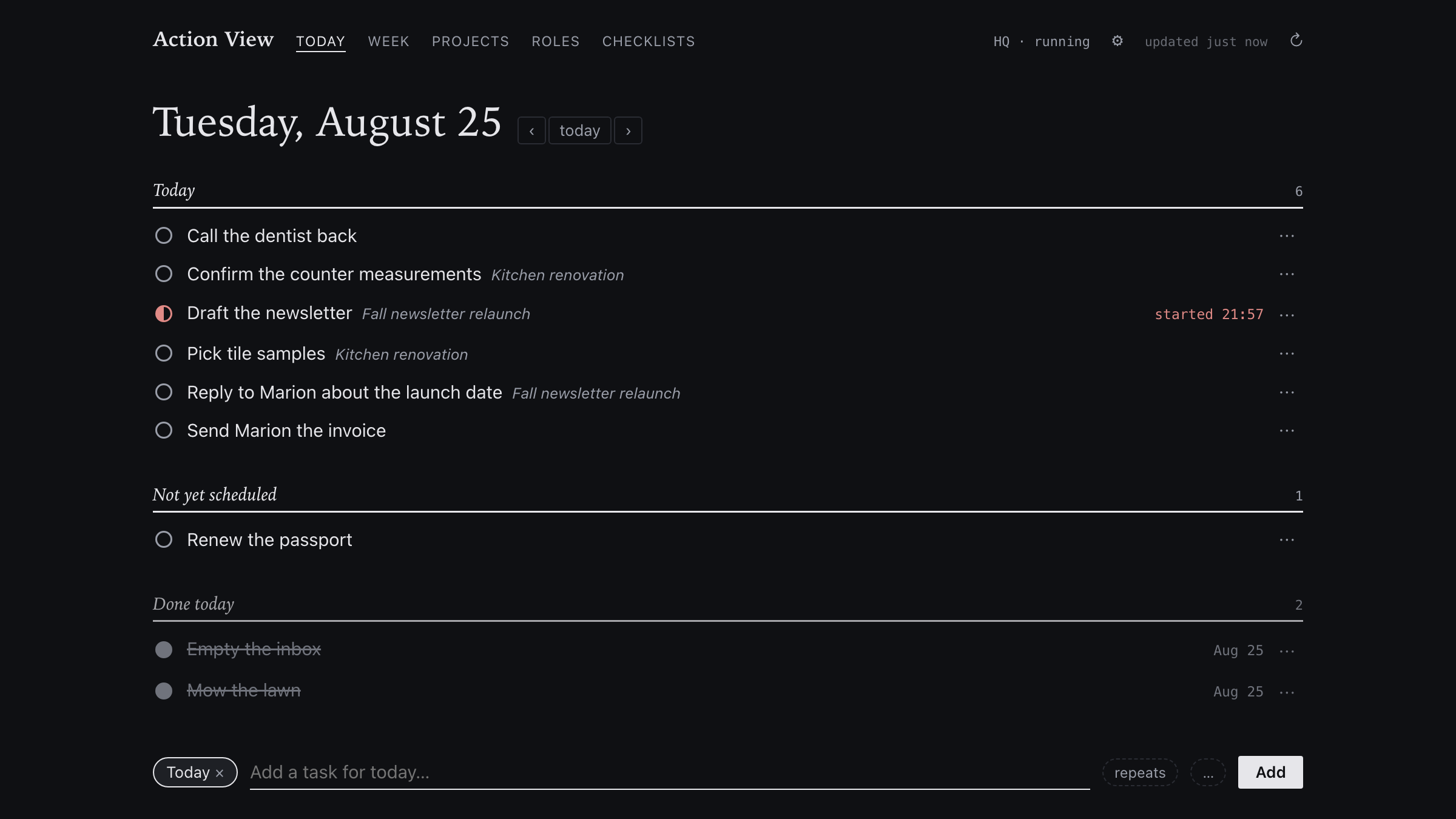
“My action view is pretty much always open on my computer. It shows me the daily brief, and I have a little pencil next to each section, so I can update it throughout the day as I need to. And every Sunday, it updates a monthly report that, the last week or two, I've just cribbed completely—just copy and paste. It's amazing what it seems to understand.”
Robin Hastings

I built HQ, and I run my life on it.
About a year ago, after twenty years of building productivity systems inside other people's apps, I built HQ: the environment I share with Claude for working and thinking. My morning brief is waiting when I wake up. The weather report picks the day I mow the lawn. A receipt dropped in a folder is filed before I've put my phone down. None of that came in the box. I built it by talking to Claude.
HQ for Action is the task and project management from my HQ, ready to load into yours. And I'm with you at the live sessions.
“The junk is out of my head, and I'm not spending hours and hours on maintenance.”
Angus Lockyer
“Before, you just had to accept friction. That was what using apps was. Now you can be on the lookout for friction, because you can get rid of it.”
Francis Miller
How it works
-
Paste one line.
After you buy, the line arrives by email. Paste it into a terminal window (the video shows how to open one). It installs Claude Code, the version of Claude that works in your files, plus two small helpers, all free and removable. A few minutes later, your Setup page opens.
-
Connect your calendar.
Google Calendar, so Claude can read and change your events. Google shows an “unverified app” warning because the app is still in Google's review queue. It only asks to see your calendar, and the video walks you through it.
-
Turn on search by meaning (optional).
It adds to the keyword search that already works, using a Voyage AI key that costs pennies a month.
What's in HQ for Action
HQ for Action itself. Tasks, projects, roles, people, meetings, your calendar, search, backups, overnight jobs (your computer needs to be on for those), and a page in your browser for your day.
The one-line install. Paste it, answer one question, meet your Claude. Mac and Windows.
The install and setup videos, at hqforaction.com/videos.
Live support sessions. With me, regularly, for as long as I run them. Bring whatever isn't working.
A month of Runs on HQ, free. My membership, below.
Plus: every update to HQ for as long as I run it, and a real address when something's broken (it comes to me, not a queue).
“This is the most fun I've had in a productivity system in a long time!”
Steve Danforth, Director of Digital Strategy, Connected Technologies
What it costs
$197, once. You own it.
Two things cost money each month: your Claude subscription (Pro at $20 is enough to live in HQ; Max at $100 is for building new tools every week), and Runs on HQ at $49 if you stay past the free month. Everything else is free.
HQ for Action also saves Claude work. Everyday jobs like adding a task or moving a date run through ready-made scripts, so Claude isn't reasoning its way through each one and spending your usage to do it.
If you can't get it installed and working, email me and I'll refund you.
Don't buy this if
- You want an app you download and open. HQ is a folder of your own files, with Claude working inside it. The point is talking to Claude.
- You want it to work without ever saying what you want. HQ molds to you when you tell Claude what's off. That takes a sentence, not a weekend.
Then: Runs on HQ.
Runs on HQ is my membership: two sprints a month, each three or four live sessions building one specific thing, plus two ongoing tracks and years of recordings you can search. HQ for Action comes with a month free. After that it's $49 a month, and if you join during the founding period, that price holds for as long as you stay.
FAQ
Where do I actually talk to it?
In the Claude app, on your phone or computer. The app connects to Claude Code running on your computer, which is what can see and change the files in your HQ folder, so that computer needs to be on and awake. The install sets it all up.
Can I get at it from my phone?
Yes, through the Claude app, as long as your computer is on. I do real work from my phone with HQ.
Windows?
Yes.
What about updates?
They arrive beside your changes, never over them, and your history is kept, so nothing you built gets overwritten.
Can my team use it?
HQ is built for one person. If you want to share it, that's a thing to ask me about.
Coming from Tana, Notion, Todoist, or another tool?
Bring your stuff over. If your old tool can export your data or connect to other apps, Claude can build what it needs to move your tasks and projects in. And if you're staying in Tana for now, HQ can work alongside it.
Get HQ for Action.
An assistant that already knows your work, and a foundation for building the tools you need. $197, once.
Questions? hq@hqforaction.com. I read every one.